How to Detect WordPress Form Abuse with Fraud Protection
WordPress sites collect leads through contact forms, newsletter plugins, membership registration, and WooCommerce checkout. Default spam tools were built for comment floods and naive bots. They were not built for disposable inboxes, VPN-heavy traffic, scripted fills, or the volume of fake leads that now pollute CRMs and marketing automation lists.
If you run a WordPress site, an agency portfolio, or a WooCommerce store, you have likely seen the pattern: entries that look fine in wp-admin but never convert, list growth that spikes overnight, and plugins like Akismet or reCAPTCHA that still let obvious junk through.
Fraud Protection detects fake leads, low-quality submissions, form spam, and automated form submissions by analyzing every submission across 100+ signals: behavior, email, IP, device, and more. On WordPress, that intelligence ships as an official plugin so your team can surface risk before bad data spreads downstream.
For the full supported integration matrix and a side-by-side view of multi-signal scoring versus CAPTCHA-style defenses, see our Fraud Protection for WordPress page. Install from WordPress.org when you are ready to go live.
Why WordPress Form Abuse Keeps Getting Through
WordPress gives you familiar layers: Akismet for comments, honeypot fields in popular form builders, and reCAPTCHA add-ons for Contact Form 7, WPForms, Gravity Forms, and Elementor. Each tool solves a narrow problem. None of them evaluate whether the data in a submission should be trusted.
Akismet is strong for comment spam. It is not a full fraud layer for high-value forms, checkout flows, or account registration.
Honeypots catch naive bots that fill hidden fields. They fail against headless browsers, human-solver farms, or scripts that mimic real field interaction.
reCAPTCHA adds friction for humans while bots increasingly pass challenges. Even when a challenge is solved, the submission is still accepted. The system verified a puzzle, not whether the email is disposable, the IP is a datacenter, or the same device submitted fifty forms this week.
What most WordPress stacks lack is intelligence about who is submitting: email domain age, connection type, device consistency, submission velocity, and behavioral patterns that separate a real prospect from automation.
For a deeper look at why challenge-based defenses are failing site-wide, see CAPTCHA Is Dead: Why Bots Win and What Replaces Them. For a no-code site that uses a JavaScript snippet instead of a plugin, see How to Stop Fake Form Submissions on Webflow.
What Form Abuse Costs on WordPress
Fake submissions look like a nuisance until you trace where the data goes.
CRM and pipeline pollution is the most common pain point. A Contact Form 7 lead that syncs to HubSpot, or a WPForms entry that triggers a sales workflow, still counts as pipeline activity even when the address bounces on day one.
Wasted automation follows immediately. Fake signups fire welcome sequences, trial activations, and coupon emails to addresses that will never convert. Each hard bounce chips away at sender reputation.
Billing inflation shows up in tools charged per contact or per send: Mailchimp, MailPoet, FluentCRM, Kit, and similar plugins inherit every fake subscriber your forms let through.
WooCommerce-specific abuse adds coupon farming, fake account creation, and checkout probing used to test stolen cards or abuse promotions.
The timing problem is the same on every stack: WordPress accepts the submission first. By the time you review entries in wp-admin or see the contact in your CRM, the damage is already done.
How the WordPress Plugin Scores Submissions
Opportify Fraud Protection on WordPress uses a hybrid deployment: client-side behavioral telemetry plus server-side analysis through the Fraud Protection API. That is different from Form Fraud Protection alone (snippet plus hosted form endpoint), which fits static sites like Webflow. The plugin handles both layers for you.
| Layer | What runs | What it contributes |
|---|---|---|
| JS SDK (CDN) | Loads asynchronously in the site header via opportify-telemetry |
Typing cadence, pointer movement, scroll depth, device entropy, automation indicators, session token attached at submit |
| PHP integration | Hooks into each supported form plugin and core flows | Sends submission fields, IP, email, and behavioral token to https://api.opportify.ai for synchronous scoring |
| Your policy | Allow, Flag, or Block per integration and risk level | You decide how to act on the Explainable Risk Report |
Each submission receives a normalized risk score from 200 to 1000 (higher means riskier) and a risk level with structured reason codes. Fraud Protection scores each submission. Your team owns the policy: strict Block actions on public contact forms, Flag-only for WooCommerce registration while you tune thresholds, or allow-with-logging during a soft launch.
Protection stays invisible to legitimate users. There is no image puzzle or extra click step. Analysis typically completes in under a second during submit processing.
Supported surfaces
The plugin integrates with the tools WordPress teams already run. Full lists, screenshots, and rollout notes live on the WordPress integration page.
Forms and core flows
- WordPress comments and user registration
- WooCommerce checkout and account registration
- Contact Form 7, WPForms, Gravity Forms, Elementor Pro Forms, Ninja Forms, Fluent Forms, Forminator, Formidable Forms, and Mailchimp for WordPress
Newsletter and CRM plugins
- Brevo, Email Subscribers, FluentCRM, Kit, MailerLite, MailPoet, and Newsletter
For each integration, configure Allow, Flag, or Block by risk level:
| Action | What happens |
|---|---|
| Allow | Low-risk submissions proceed normally. |
| Flag | The submission is accepted. Risk score, level, and contributing factors are stored as metadata and surfaced in admin list views for review. |
| Block | When you configure this action, high-risk submissions do not sync downstream; visitors see your custom message. |
When you choose Flag, the plugin writes metadata using each integration's native storage (comment_meta, user_meta, WooCommerce order meta, or form entry meta). Recent releases also surface risk in familiar admin workflows: flagged comments can route to spam, WooCommerce orders can move to on hold, and several form plugins show starred or spam-marked entries so reviewers see risk without leaving wp-admin.
Step-by-Step: Detect Form Abuse in WordPress Admin
You need an Opportify account (14-day free trial, no credit card required) and permission to install plugins.
1. Install the plugin
In Plugins → Add New, search for Opportify Fraud Protection, or install from the WordPress.org plugin directory. Requires WordPress 6.0+ and PHP 8.1+. Activate the plugin and open Opportify in your admin menu.
Prefer a walkthrough with visuals first? The WordPress integration page shows live admin screenshots: Reports overview, submission log, General settings, and per-integration risk actions.
2. Connect API keys and enable protection
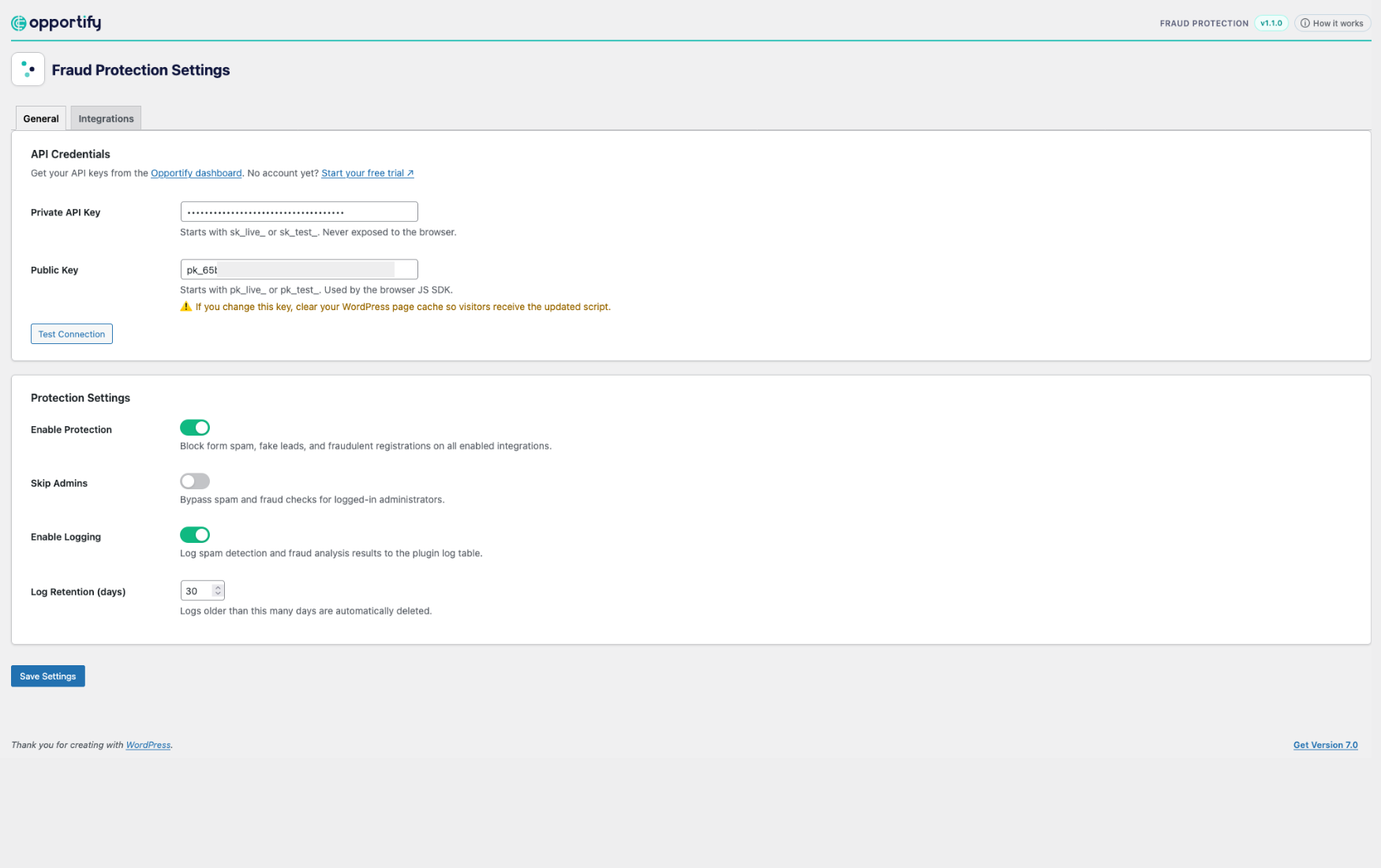
In app.opportify.ai, copy your private API key (server-side analysis) and public key (telemetry script). Paste both into the plugin General tab, toggle Enable Protection, and run Test Connection.
The plugin resolves the latest JS SDK build from the Opportify CDN manifest and caches the script URL for two hours. It is compatible with WP Rocket, LiteSpeed Cache, W3 Total Cache, and Autoptimize. If you rotate your public key, clear page cache afterward.
3. Enable integrations and set risk actions
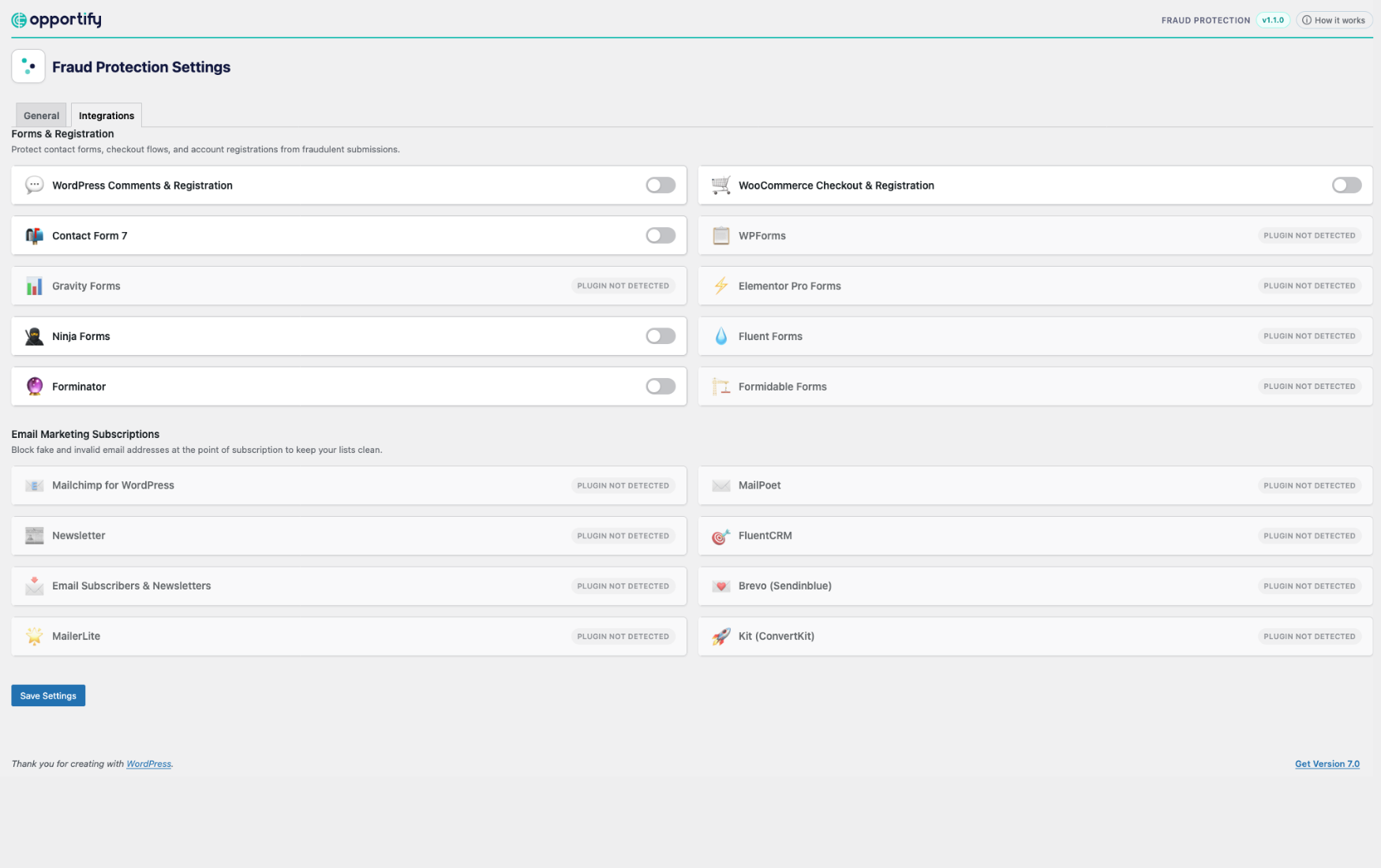
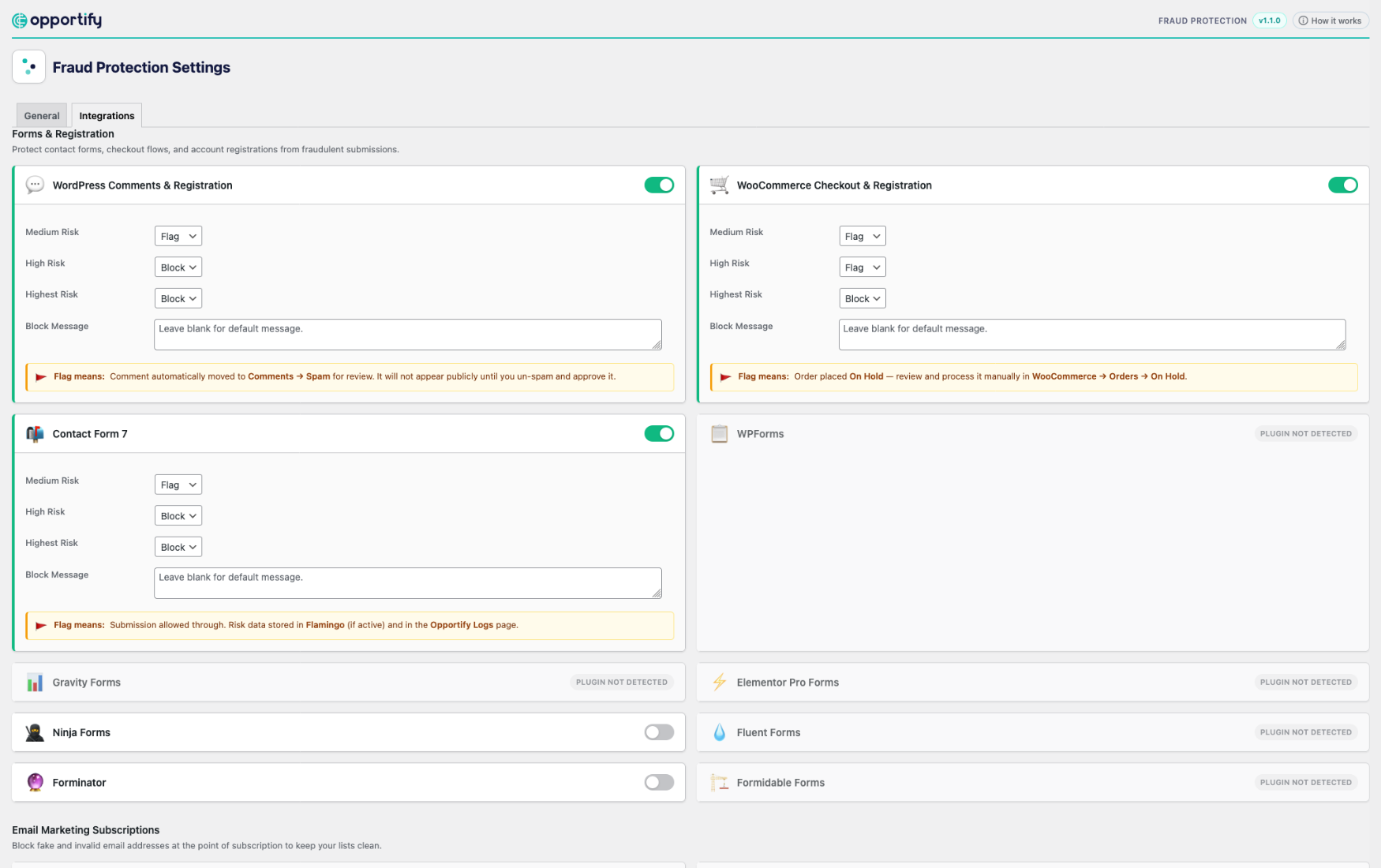
On the Integrations tab, enable the form plugins and flows you use. Set medium, high, and highest actions independently per integration so checkout, registration, and contact forms can follow different policies.
A practical starting point:
- Flag on medium risk for visibility while still accepting borderline leads
- Block on high and highest risk once you have reviewed a week of traffic in Reports
4. Review Reports and tune policy
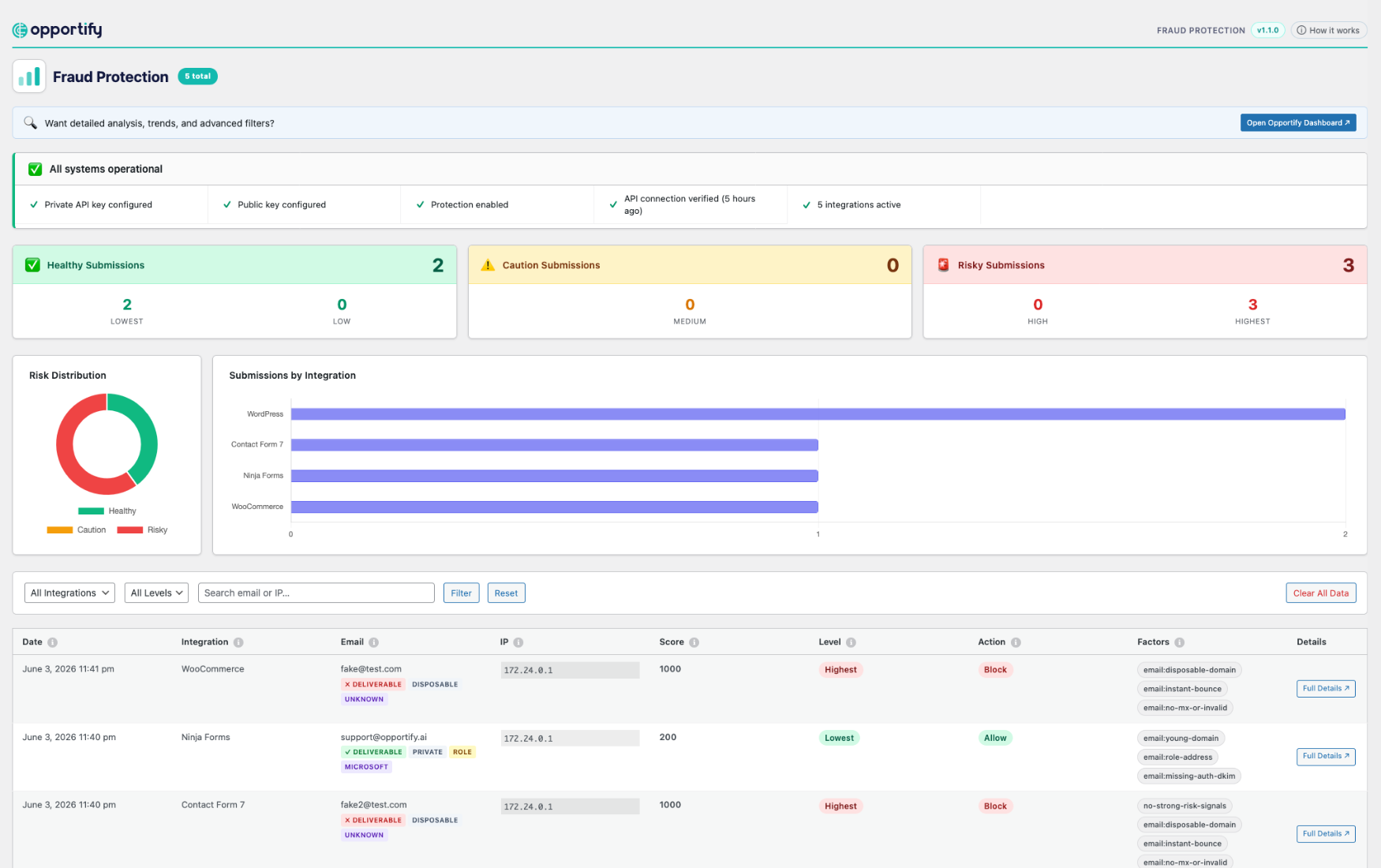
Open Opportify → Reports for:
- A health checklist (API keys, connection status, active integrations)
- Risk distribution (Healthy, Caution, and Risky submissions)
- Submissions by integration (which forms attract the most risk)
- A filterable submission log with score, level, action taken, and contributing factor pills
- Enriched email and IP intelligence chips on log rows (deliverability, connection type, country, blocklist signals) plus a link to full analysis in the Opportify dashboard
Agencies and DevOps teams can version-control settings by copying opportify-config-sample.php to the site root as opportify-config.php (Bedrock, Trellis, and multi-environment pipelines). When that file exists, wp-admin settings become read-only and your deployment owns the configuration.
Skip Admins is enabled by default so users with manage_options are not scored during development. Disable it in settings when you need to test against real checks.
If the Fraud Protection API is unreachable, the plugin applies your configured fallback action (default: Allow) so legitimate traffic still proceeds during a transient outage. You can choose a stricter fallback if your risk posture requires it.
What the Explainable Risk Report Surfaces
Every scored submission includes reason codes your team can read without guessing. Representative signals include:
| Signal | What it catches |
|---|---|
| Disposable email | Temp inboxes, throwaway domains, mailinator-style providers |
| Connection type | VPN, open proxy, Tor, or datacenter origin masking the real source |
| Bot behavior | Programmatic fill speed, no pointer movement, instant completion |
| New domain | Email domains registered in the last 30–90 days |
| High submission rate | Same device or IP submitting repeatedly in short windows |
These are examples, not the full model. The platform evaluates a broader signal set continuously behind the scenes.
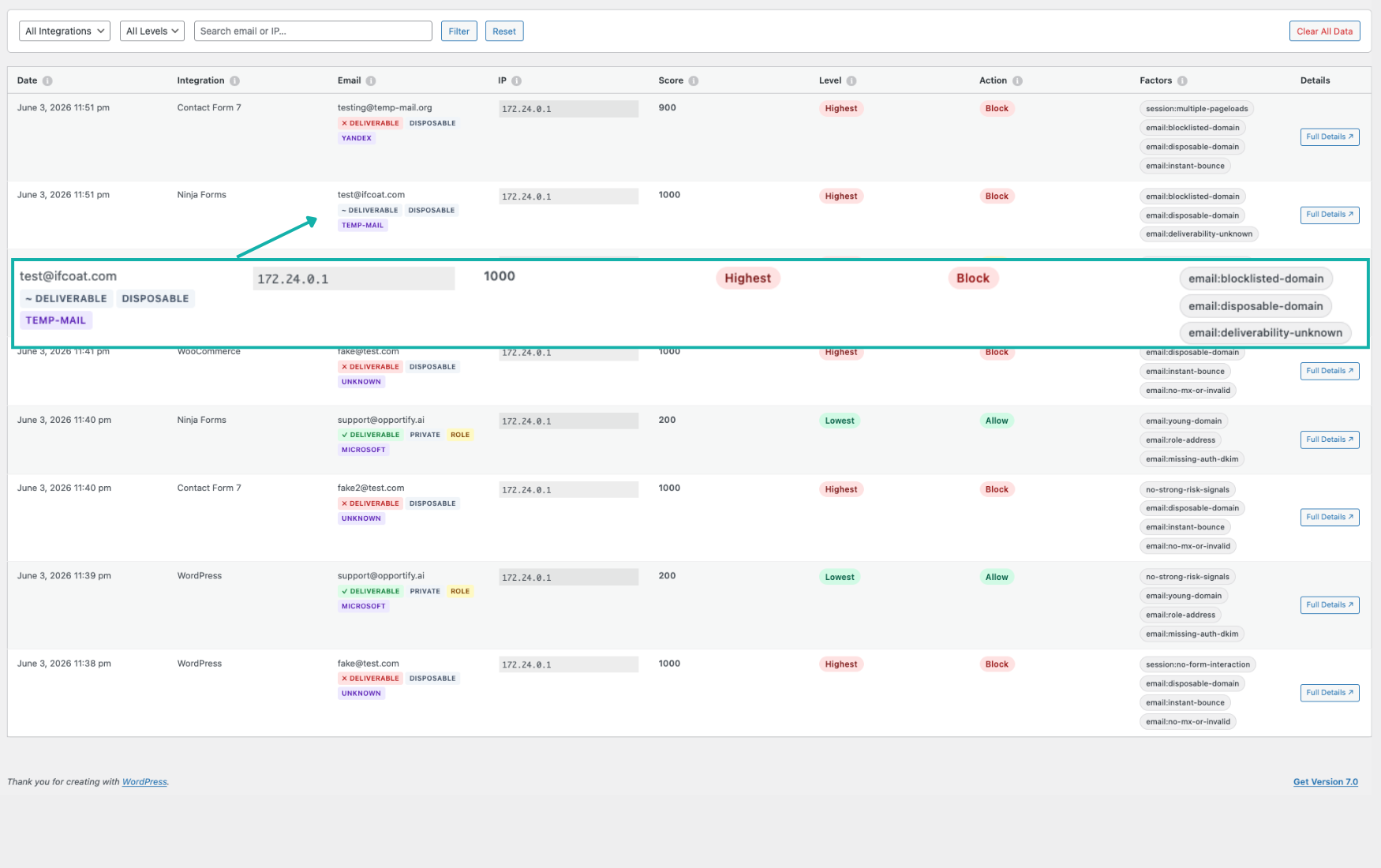
Threshold labels follow the standard scale: lowest (≤300), low (301–400), medium (401–600), high (601–800), highest (>800). Align plugin actions with how your team reviews flagged entries.
Log retention in wp-admin defaults to 30 days and is configurable in settings or opportify-config.php. For privacy details, review the Privacy Policy and GDPR Notice. The plugin UI is translated into 10 languages, including German, Spanish, French, Italian, Japanese, Dutch, Polish, Portuguese (Brazil), Russian, and Simplified Chinese.
Routing Flagged Submissions in Your Stack
Block (when you configure it) keeps high-risk entries from reaching CRM plugins, email notifications, or WooCommerce order flows.
Flag preserves edge cases in workflow while adding context. Risk badges appear in native list tables so support or sales can prioritize review.
If you need downstream automation beyond wp-admin:
- HubSpot or CRM sync: only push contacts when risk level is low, or tag medium-risk leads for manual review
- Newsletter plugins: suppress high-risk signups before they hit MailPoet, FluentCRM, or MailerLite audiences
- Zapier or Make: branch on
risk_levelfrom webhook payloads when you combine custom handlers with the plugin
The goal is consistent across patterns: evaluate trust before the lead becomes expensive. Pricing for analysis volume is on our pricing page; plans use continuous quota selection rather than named tiers.
Why Multi-Signal Scoring Eliminates the Need for CAPTCHA on WordPress
Challenge-based tools ask bots to prove they are human. Risk-based scoring asks whether a submission looks legitimate, regardless of how it was submitted.
A bot that solves reCAPTCHA still lands in your CRM like a real lead. A submission scored 850 with reason codes such as disposable_email, datacenter_ip, and bot_behavior can trigger the Block action you configured, keeping it from reaching your CRM, or surface for review when you use Flag.
Multi-layer fraud protection eliminates the need for CAPTCHA puzzles on modern forms: real users see nothing, while risky submissions are detected before they reach your team. Compare approaches on the WordPress integration page, which includes a fraud scoring versus CAPTCHA-style comparison table.
Key Takeaways
- WordPress default spam tools filter mechanisms, not submission quality: honeypots and CAPTCHA do not evaluate email, IP, device, or behavioral trust.
- Form abuse drives CRM pollution, wasted email automation, inflated marketing bills, and WooCommerce-specific fraud patterns.
- The official WordPress plugin deploys hybrid mode: JS SDK telemetry plus Fraud Protection API scoring on every supported integration.
- Per-integration Allow, Flag, and Block actions let your team enforce policy without CAPTCHA friction.
- Start on the WordPress integration page for screenshots and rollout context, then install from WordPress.org and tune from live Reports data.