Best Akismet® Alternative for WordPress Form Protection
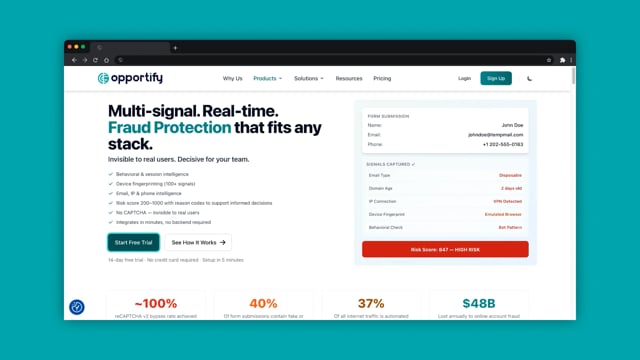
Akismet filters spam by analyzing text content and IP data. Fraud Protection scores every submission across 100+ signals including behavior, device, email, and IP to surface threats that content-focused analysis alone misses.
14-day free trial. No credit card required.
Install from WordPress
Quick Comparison
How the two approaches differ at a glance.
| Feature | Akismet | Fraud Protection |
|---|---|---|
Detection Method | Content + IP database | 100+ signals (behavior, device, email, IP, content) |
Risk Scoring | Binary (spam / not spam) | Granular 200–1000 scale with reason codes |
Behavioral Analysis | Not available | Typing, mouse, timing, automation signals |
Explainability | No reason codes | Explainable Risk Report with structured reason codes |
Form Coverage | Comments, popular form plugins (CF7, WPForms, Gravity Forms, etc.) | Comments, registration, checkout, contact, lead gen |
Setup | Install plugin + create account + API key | Install plugin + create account + API key |
Pricing Model | Per-site with spam check limits | Per-analysis, no per-site fees |
What Is Akismet?
Akismet is a cloud-based spam filtering service built by Automattic, the company behind WordPress.com and WooCommerce. It analyzes text content, IP addresses, and user agents against a global spam database to classify submissions as spam or not spam.
It works invisibly in the background with no user-facing challenges, integrates with popular WordPress form plugins, and offers a developer-friendly API for custom integrations.
Why Companies Look for an Akismet Alternative
Akismet works well for traditional comment spam. But as threats evolve, many teams need capabilities beyond content analysis.
Modern bots bypass content filters
Large language models generate human-quality text. Headless browsers and rotating residential IPs make bot submissions indistinguishable from real users when content is the only signal.
Binary verdicts lack nuance
Spam or not spam leaves no room for gray areas. Teams cannot set their own risk thresholds or prioritize review queues without a confidence score and reason codes.
False positives cost revenue
Legitimate submissions can end up in the spam folder. Recovering lost leads means manual review, which costs time and risks missed opportunities.
Per-site pricing penalizes scale
Agencies and multi-site operators pay per site. Costs compound as the number of WordPress installations grows, regardless of actual submission volume.
Use Cases
Where multi-signal fraud detection outperforms content-based filtering.
WooCommerce Checkout Fraud
Score every checkout submission to flag orders from disposable emails, datacenter IPs, or automated scripts before payment processing.
Fake Account Registration
Detect bot registrations and synthetic identities using behavioral signals that reveal non-human form interaction patterns.
Contact Form Spam and Lead Quality
Move beyond binary spam filtering. Score every lead with reason codes so your team routes high-quality submissions to sales and flags suspicious ones for review.
Multi-Site Agency Protection
Protect all client sites under one account with per-analysis pricing. No per-site fees, no plan upgrades as your portfolio grows.
Who Should Choose Which?
Both tools serve different needs. Choose based on your threat landscape and requirements.
Akismet is a good fit if…
- •You run a personal blog and comment spam is your main concern
- •You want the simplest possible solution for traditional spam
- •You do not need granular scoring or custom risk thresholds
- •Your forms only receive traditional link-based or keyword-based spam
Fraud Protection is a good fit if…
- •You need to detect fake leads, bot registrations, or suspicious checkout activity
- •Your forms are targeted by sophisticated bots that generate human-quality content
- •You want granular risk scores with explainable reason codes
- •You are tired of checking the spam folder for legitimate submissions
- •You manage multiple WordPress sites and need one account without per-site fees
- •You need protection on registration, checkout, contact, and lead gen forms
Related Resources
Explore WordPress fraud protection, CAPTCHA bypass research, and multi-signal form scoring.
How to Detect WordPress Form Abuse with Fraud Protection
Detect WordPress form abuse with multi-signal fraud scoring. Use the official plugin to surface risky submissions and act by policy.
Read articleResearchCAPTCHA Is Dead: Why Bots Win and What Replaces Them
Learn why challenge-based defenses fail against modern bots and what actually detects bad actors.
Read articleSolutionForm Fraud Protection: Detect Fake Leads and Form Abuse
Score every form submission across 100+ signals with one JS snippet. No CAPTCHA needed. Explainable risk scoring for any web form.
Read articleReady to move beyond content-based filtering?
Deploy multi-signal fraud detection on your WordPress site in minutes. Explainable risk scoring your team can act on.
- Access to Email and IP Insights
- Pre-built workflows and SDKs included
Works alongside existing plugins. Install the plugin, add your API key, and you're live.
Frequently Asked Questions
Can I use Fraud Protection alongside Akismet?
How is Fraud Protection different from a spam filter?
Which WordPress forms does Fraud Protection support?
What happens when a submission is flagged as high-risk?
How does setup compare to Akismet?
Is Fraud Protection cost-effective for small sites?
Will it slow down my forms?
Does Fraud Protection work outside WordPress?
POST /intel/v1/fraud/analyze) is a platform-agnostic server-to-server endpoint. Any application that can make HTTP requests can submit data for scoring: SaaS registration flows, mobile apps, custom backends, or third-party form builders.