Email Reputation Check Explained: What Each Signal Means and Where It Misleads
An email address can be perfectly valid and still come from a domain with a weak reputation. An email reputation check looks past the mailbox to the domain behind it: how it authenticates mail, how old and well maintained it is, whether it appears on blocklists, and which mail security policies it publishes. Each of those signals means something specific, and each one can mislead you if you read it alone. This post walks through the signals one by one, explains what they tell you, shows where they go wrong, and ends with an illustrative example of how a reviewer might read two results.
What Email Reputation Is
Our email reputation checker compares email reputation to a credit score for an address and its domain. Mailbox providers, spam filters, and security tools use it to decide whether messages land in the inbox, get flagged as suspicious, or see poorer inbox placement.
The same page makes a point that is easy to miss: reputation works in two directions.
- Outbound. When you send email, your own domain's reputation affects whether your messages reach the inbox.
- Inbound. When someone types an address into your sign-up form, lead form, or CRM import, the reputation of that address's domain helps you decide how much to trust it before it enters your systems.
The signals are the same in both cases. The question you are asking is different.
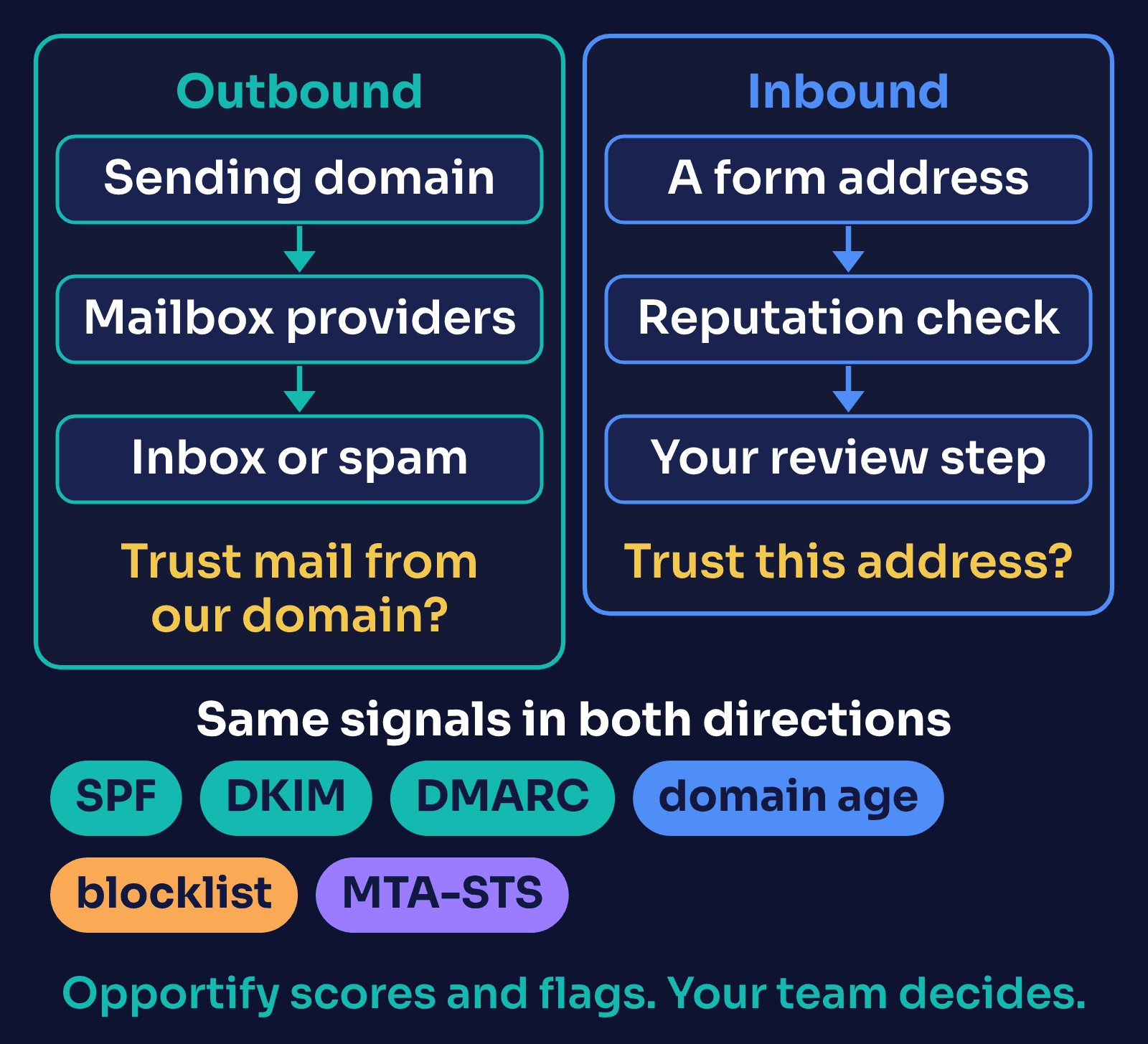
This post focuses on the inbound question, because that is where a reviewer has to make a decision about someone else's address.
What an Email Reputation Check Reads
The signals below are the ones documented on the email reputation checker, the assessed signals page, and the Analyze Email API reference. We describe only those documented signals. For how they combine into a number, see What Is an Email Risk Score. This post stays on what each signal means.
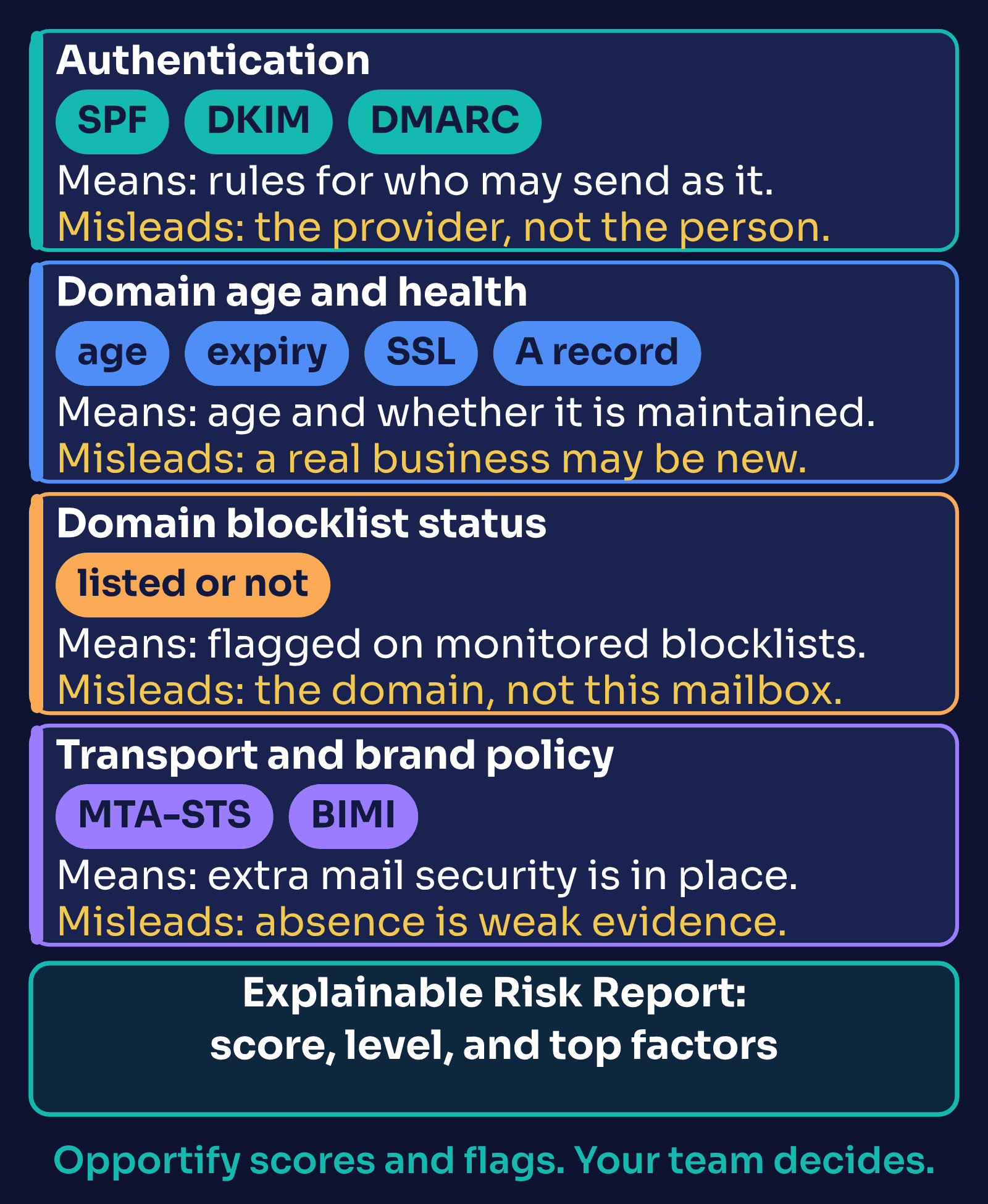
Authentication: SPF, DKIM, and DMARC
What each one means. These are DNS records the domain owner publishes.
- SPF lists the servers allowed to send mail for the domain (RFC 7208).
- DKIM lets a domain sign its messages so a receiver can verify the domain took responsibility for them and that the signed content was not altered (RFC 6376).
- DMARC lets the domain owner publish a policy for what receivers should do with mail that fails those checks (RFC 7489).
The Analyze Email response reports them as spfValid, dkimConfigured, and dmarcValid in its emailDNS block. When they are missing or weak, the email risk score page explains why that matters: weak or missing authentication makes it easier for bad actors to forge messages from the domain. That shows up as risk factors such as missing-auth-spf and spoofing-risk. Our post on email spoofing covers the attack side in more depth.
Where it misleads. Authentication describes the domain owner's mail setup, not the person typing the address. On a large free provider, the records belong to the provider, so they say nothing about whether this particular account holder is genuine. That is why the assessed signals page lists free-provider as its own factor. In the other direction, a small business with missing DMARC has not published a policy. That gap is worth noting, but on its own it does not mean the person behind the address is malicious.
Domain age and health
What it means. With domain enrichment enabled, the Analyze Email response can include a domain block. Its fields include the domain's age in whole years (ageYears), its creation and expiration dates, whether it serves a valid SSL certificate (sslValid), and whether it has valid A records (aRecordValid). Related risk factors on the assessed signals page include new-domain, young-domain, domain-expired, domain-expiring-soon, and invalid-ssl. The email reputation checker notes that newly registered domains lack sending history and are often treated with suspicion.
Where it misleads. Young is not the same as fraudulent. A real company that launched last month also has a young domain. An expiring domain may simply be one that an owner has not renewed yet. Treat age and health as context that raises or lowers how closely you look, not as a decision.
Domain blocklist status
What it means. The domain.isBlockListed field shows whether the domain appears in monitored blocklists, and the matching risk factor is blocklisted-domain. The reputation checker describes these lists as ones that security providers maintain to track domains known for spam or abuse.
Where it misleads. A domain listing is about the domain as a whole. On a shared or compromised domain, one bad actor can cause a listing that affects every address on it. A listing is a strong reason to look closer. It is not proof about the specific person in front of you.
Transport and brand policy: MTA-STS and BIMI
What it means. MTA-STS lets a domain declare that mail sent to it must use TLS encryption (RFC 8461). BIMI lets a domain publish a brand indicator for supporting mail clients. The Analyze Email reference returns them as mtaStsStatus and bimiStatus, and the reputation checker treats their presence as a sign that the domain has transport security controls configured.
Where it misleads. These policies take extra effort, and many legitimate small senders do not publish them. Absence is weak evidence. Presence is a mild positive, not a guarantee.
When enrichment is not available
The API reference adds one more nuance. The domain block includes enrichmentAvailable. When it is false, the other enrichment fields hold safe defaults, and the reference states that they must not be used for decision-making. A default of 0 for ageYears in that case does not mean the domain is brand new. Check this flag before you build any rule on domain age or domain blocklist status.
Reputation, Validation, and the Score
Three related ideas often get blended together:
- Validation asks whether an address is well formed and can receive mail. Our checklist on what to look for in an email validation API covers that ground.
- Reputation asks how trustworthy the domain behind the address looks, using the signals above.
- The risk score combines these and other signals into one normalized number and a level. What Is an Email Risk Score explains how it is built and what the levels mean.
The email risk score page puts the difference plainly: a valid address can still carry high risk if it belongs to a disposable provider or a domain with weak authentication. Reputation signals are part of what makes that visible.
An Illustrative Worked Example
The following example is illustrative. The domains are reserved for documentation by RFC 2606, and every value is invented to show how a reviewer reads a result. They are not real lookups.
Two sign-ups arrive on the same afternoon.
- Address A is
maya@example.com. SPF is valid, DKIM is configured, DMARC is valid, the domain is 11 years old, it is not blocklisted, and MTA-STS is present. The Explainable Risk Report shows a score of 260 at levellowest, with no elevated risk factors. - Address B is
sales@example.net. SPF is not valid, DKIM is not configured, DMARC is not valid, the domain is under a year old, it is blocklisted, and MTA-STS is absent. The report shows a score of 780 at levelhigh, with top factorsblocklisted-domain,spoofing-risk, andmissing-auth-spf.
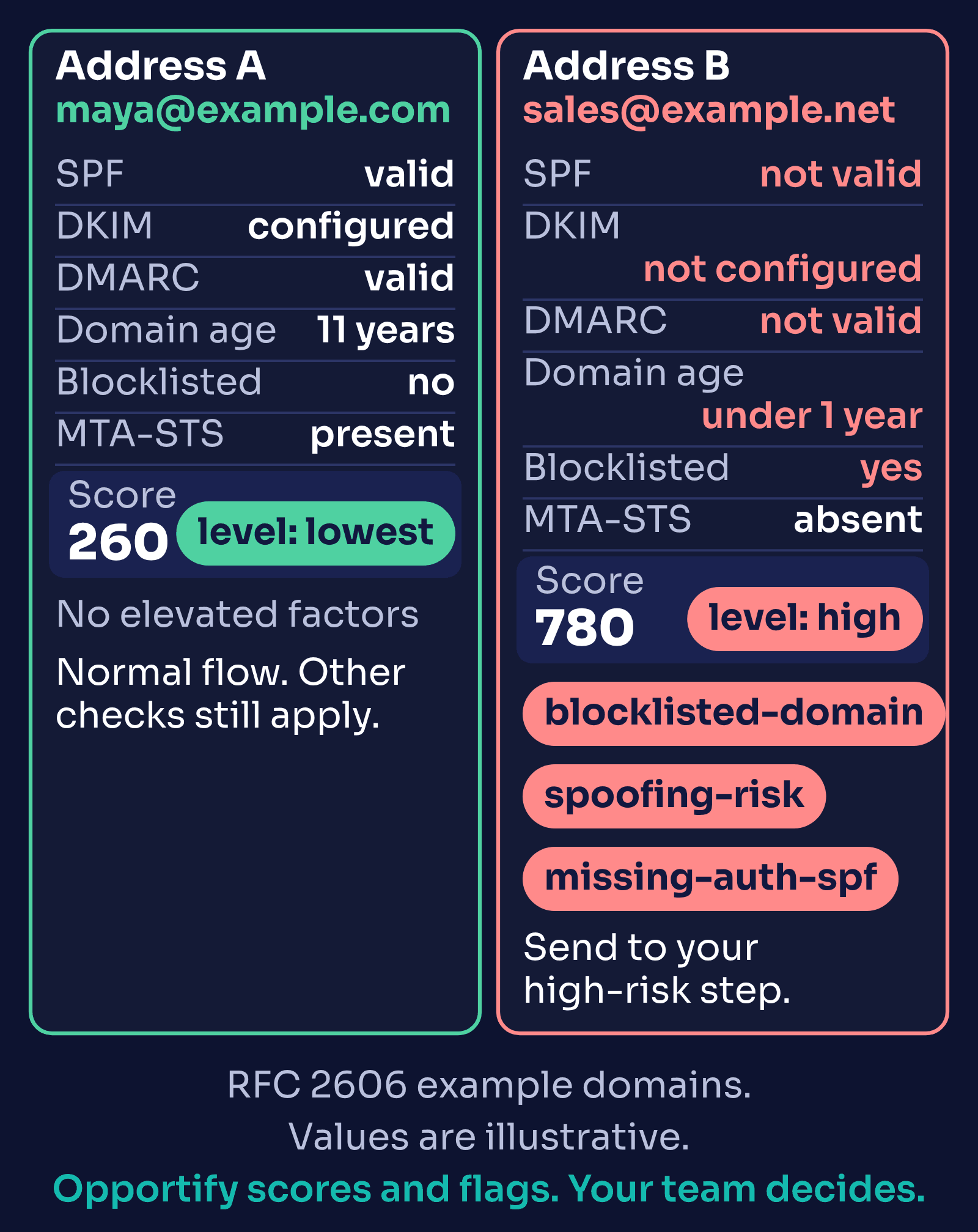
What happens next depends on your policy. A reasonable approach:
- Address A continues through your normal flow. Good domain hygiene is not proof that the person is genuine, so your other checks (IP, session, payment) still apply.
- Address B goes to whatever step your team has defined for high risk, such as a review queue or an extra verification step. The reviewer starts with the factors. A young domain with a blocklist listing and no authentication reads very differently from a young domain that is otherwise well configured.
Opportify scores and flags both addresses. Your team decides what happens to each.
Key Takeaways
- An email reputation check reads the domain behind an address: authentication (SPF, DKIM, DMARC), age and health, blocklist status, and mail security policies (MTA-STS, BIMI).
- Every signal has a blind spot. Free providers make authentication say nothing about the person, young domains include real new businesses, domain listings are not about one mailbox, and missing policies are weak evidence.
- Check
enrichmentAvailablebefore you rely on domain-level fields. - Reputation is not validation, and it is not the whole score. See What Is an Email Risk Score for how the score is built.
- Opportify scores and flags. Your team decides.
Check an Email Now
Run any address through the free email reputation checker to see its authentication health, domain signals, and blocklist status. When you are ready to check addresses inside your own sign-up or lead flows, explore Email Insights and see pricing for plan details. Developers can start with the Analyze Email API reference.