IP Reputation Check Explained: What the Score Tells You and What It Doesn't
Every IP address carries a track record. An IP reputation check reads that record and turns it into something you can act on: a score, a risk level, and the signals behind them. What it does not give you is a verdict. A high score on a sign-up or login says "look closer", not "this person is a fraudster", and a low score is not a promise that the visitor is who they claim to be. This post explains what goes into an IP reputation result, how to read the score bands, where reputation misleads, and how to turn a result into a review decision your team owns.
What IP Reputation Is
Our IP reputation checker describes IP reputation as a trust score based on an IP address's history and behavior: the traffic it sends, the networks it belongs to, and whether it has been linked to malicious activity. A clean history earns a low risk score. A history of spam, malware, or attack reports pushes the score up.
The useful word there is "history". Reputation is a summary of what has been observed about an address and its network. It is context for a decision, not the decision itself.
A note on terms: "IP blacklist" and "IP blocklist" mean the same thing. We use "blocklist" below, the term our docs use, but if you searched for an IP blacklist check, you are in the right place.
What Feeds an IP Reputation Result
An Opportify IP reputation score is built from five inputs documented on the Analyze IP API reference and the assessed signals page. We describe only those documented inputs here.
- Blocklist reports. Whether the IP appears on known blocklists, how many independent sources report it, how many active reports there are, and when it was last detected.
- Connection type. Each IP is classified as one of eight types:
wired,mobile,enterprise,satellite,vpn,cloud-provider,open-proxy, ortor. The docs FAQ explains that the classification draws on network ranges, ASN patterns, reverse DNS data, reputation sources, and behavior signals. - Network ownership (WHOIS). The Regional Internet Registry, the Autonomous System Number (ASN), the registered organization, and abuse, admin, and technical contacts.
- Trusted provider recognition. Whether the IP belongs to a known trusted provider, such as an enterprise security or Zero Trust Network Access (ZTNA) service.
- Reverse DNS. Whether the IP has a valid PTR record, which helps distinguish enterprise, proxy, and cloud infrastructure.
These five inputs feed the Explainable Risk Report: a normalized score from 200 to 1000, a risk level, and the highest-weight risk factors behind the score, such as ip-blocklisted, open-proxy, or cloud-hosting. The score is model-based, while the five risk levels stay fixed so they remain consistent and interpretable.
The response also returns geolocation next to the score: country, region, city, timezone, and related regional data. It is context for your reviewer, not a score input. A country or city does not raise or lower the score.
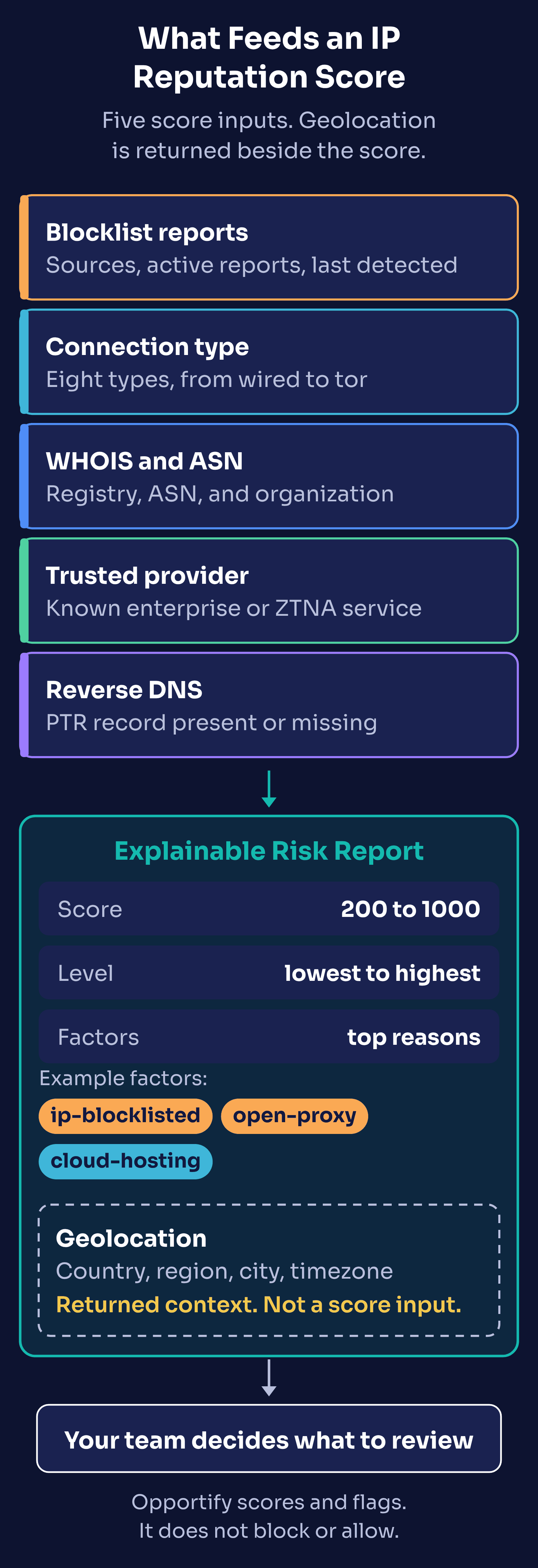
The factors matter as much as the number. Two IPs can land at a similar score for different reasons, and the reasons tell a reviewer what to check next.
How to Read the Score Bands
The score runs from 200 to 1000. Higher means riskier. The IP reputation checker splits it into five bands, and the thresholds match the risk level table in the Analyze IP API reference, where the same ranges map to the level values lowest, low, medium, high, and highest.
| Score | Level | What the checker page says it typically means |
|---|---|---|
| 200 to 300 | Lowest risk | Clean IP with no adverse signals. Typical of trusted residential or enterprise connections. |
| 301 to 400 | Low risk | Minor signals present but generally safe. May be a shared network or mobile carrier. |
| 401 to 600 | Medium risk | Notable risk signals detected. Could be a VPN, data center, or IP with some blocklist history. |
| 601 to 800 | High risk | Multiple threat signals. Often associated with known proxies, recent blocklist entries, or suspicious hosting. |
| 801 to 1000 | Highest risk | Severe risk indicators. Actively blocklisted, associated with attacks, or flagged by multiple threat intelligence sources. |
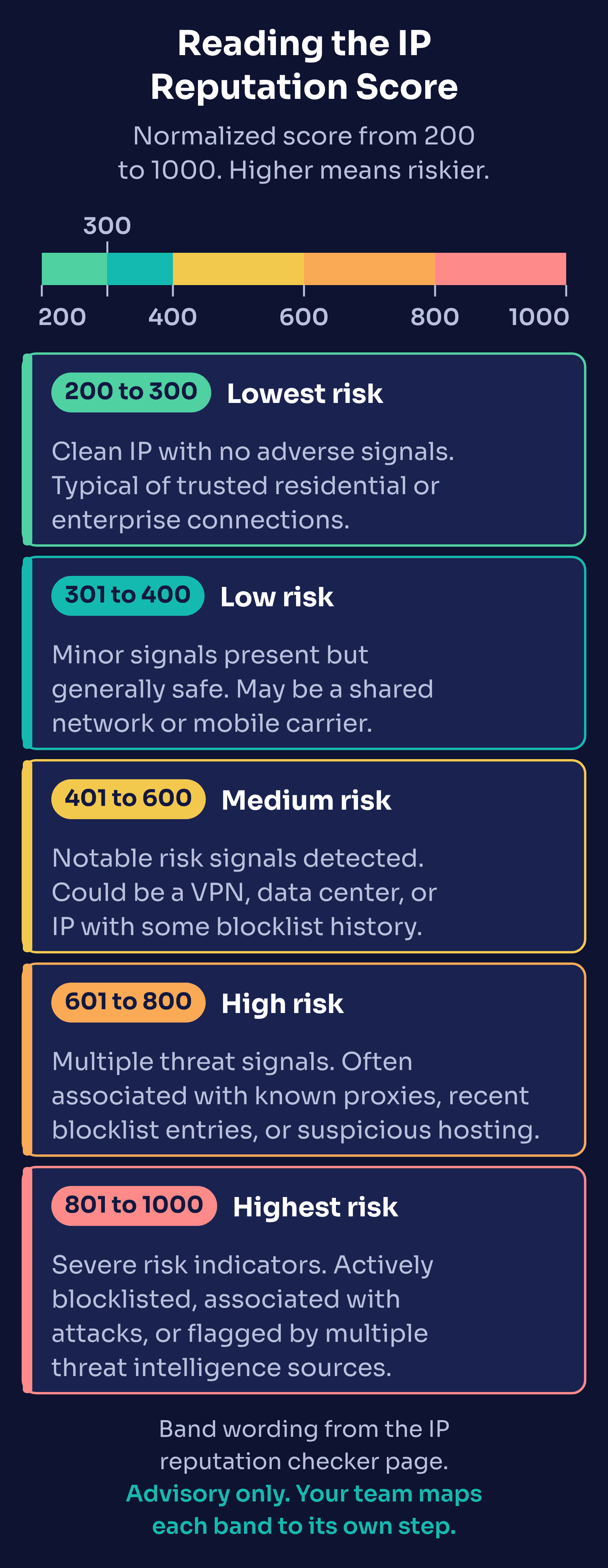
Two practical points about the bands:
- The levels are stable; the score moves. Because reports arrive and are resolved over time, an address can drift within or across bands. Key your rules to
leveland the risk factors rather than to one exact score. - You set the response. The docs FAQ notes that thresholds are not customized through the API, and that you can apply your own internal mappings. A band is an input to your policy, not the policy.
Where IP Reputation Misleads
Reputation describes an address and its network. It does not see the person. That gap shows up in a few predictable places.
Shared and carrier networks
Many people can sit behind one public IP. Mobile carriers and some internet providers use carrier-grade NAT, which by design maps many subscribers to a shared pool of public addresses (RFC 6888). The IETF's review of address sharing (RFC 6269) notes the side effect that matters here: if one subscriber on a shared address misbehaves, the reputation of the address can reflect it for everyone else. That is one reason the checker page describes the low band as possibly "a shared network or mobile carrier", and why mobile-network appears as a risk factor rather than a verdict.
Legitimate VPN and privacy users
A vpn connection type tells you traffic is routed through a VPN. It does not tell you why. Remote workers, privacy-conscious customers, and people on public Wi-Fi use VPNs every day. The assessed signals page gives a concrete example: Apple iCloud Private Relay egress is reported as vpn but scored as lower risk, and surfaced with its own icloud-private-relay factor. Our guide to separating VPN, proxy, and Tor abuse from legitimate users covers this in depth.
Location is approximate
Geolocation is useful context, but the API reference publishes its confidence levels openly: about 98 percent at the country level, 70 to 90 percent at the region level, and 50 to 70 percent at the city level. A city mismatch alone is weak evidence. Our post on IP geolocation vs. IP risk scoring explains why location and risk answer different questions.
One signal is not the whole picture
An IP with a clean record can still carry a fake sign-up, and a flagged IP can carry a real customer. The strongest decisions combine IP signals with email, session, and velocity signals. See Building a Multi-Signal Fraud Detection Stack for how those layers fit together.
An Illustrative Worked Example
The following example is illustrative. The IP addresses come from the documentation ranges reserved by RFC 5737, and the scores and counts are invented to show how a reviewer reads a result. They are not real lookups.
Two sign-ups arrive a minute apart.
- Sign-up A comes from
198.51.100.24. The connection type iswired, the IP is not blocklisted (sources: 0,activeReports: 0), reverse DNS resolves, and WHOIS shows a residential internet provider. Score 240, levellowest, with no elevated risk factors. - Sign-up B comes from
203.0.113.77. The connection type isopen-proxy, the IP is blocklisted by 4 sources with 6 active reports, the last detection was yesterday, and reverse DNS is missing. Score 870, levelhighest, with top factorsip-blocklisted,active-abuse-reports, andopen-proxy.
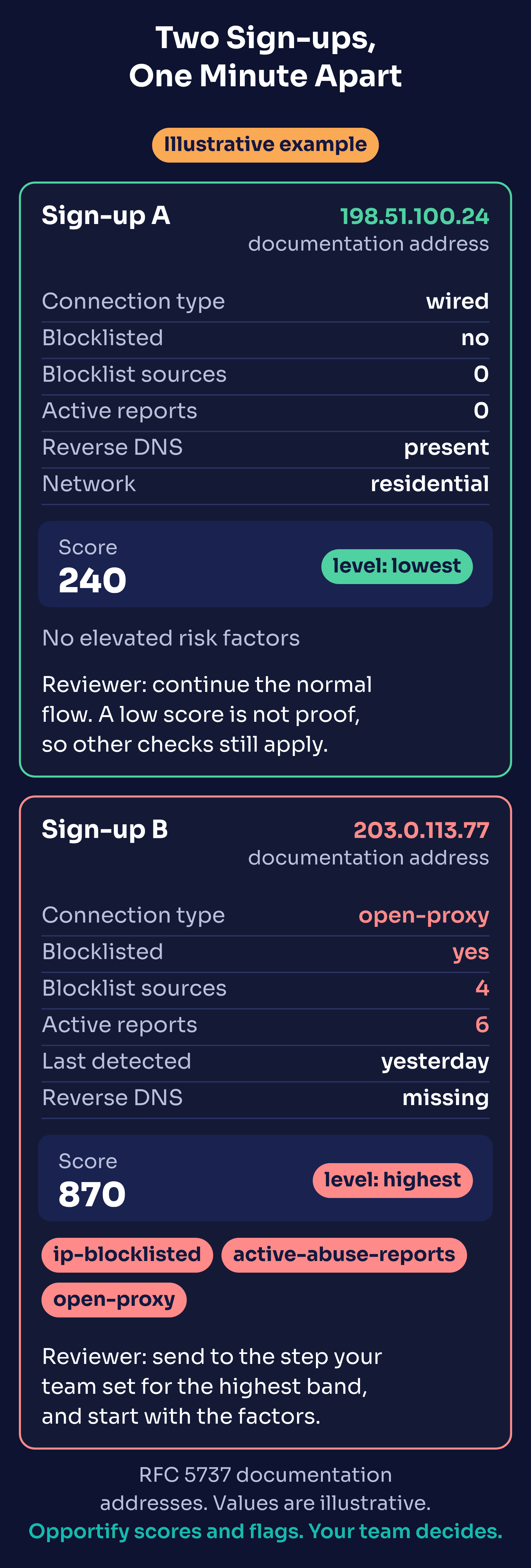
What would a reviewer do next? That depends on your policy, but a reasonable approach looks like this:
- Sign-up A continues through your normal flow. A low score is not proof of a genuine user, so your other checks (email, session, payment) still apply.
- Sign-up B goes to whatever step your team defines for the highest band: a manual review queue, an extra verification step, or a hold until other signals are checked. The reviewer starts with the factors. An open proxy with fresh, active reports reads very differently from a VPN with an old blocklist entry, even at similar scores.
Opportify scores and flags both sign-ups. Your team decides what happens to each.
If the IP Being Checked Is Your Own
Sometimes the IP with a poor reputation is your own mail server, office network, or cloud instance. The IP reputation checker FAQ suggests a sequence: scan your network for malware or compromised devices, contact your provider if the IP was used for spam, and submit a delisting request to each blocklist that reports it. Consistent clean behavior over time improves the record. The IP blacklist checker is a quick way to see which blocklist signals are present.
Key Takeaways
- An IP reputation check summarizes an address's history: blocklist reports, connection type, network ownership, trusted provider status, and reverse DNS, with geolocation returned alongside as context.
- The Explainable Risk Report pairs a 200 to 1000 score with a level and the top risk factors. Read the factors, not just the number.
- The five bands run 200 to 300, 301 to 400, 401 to 600, 601 to 800, and 801 to 1000. Key your rules to
leveland factors, and map each band to a step your team defines. - Shared carrier addresses, legitimate VPN users, and approximate location data are the most common ways reputation misleads. Combine IP with other signals before acting.
- Opportify scores and flags. Your team decides.
Check an IP Now
Run any address through the free IP reputation checker to see its score, level, blocklist status, and connection type. When you are ready to score IPs inside your own sign-up, login, or checkout flow, explore IP Insights and see pricing for plan details. Developers can start with the SDK documentation.